Historical FreeBSD 10.1 walkthrough
Version note (updated July 2026): This is an archived walkthrough for FreeBSD 10.1 and Ubuntu 15.04. Those releases are long out of support, so do not copy its package names, ISO URL, interface names, or boot commands into a production host. The underlying design remains useful: bhyve presents a guest NIC through a tap device, and the FreeBSD host can bridge that tap device to a physical interface. For a supported system, start with the current FreeBSD Handbook bhyve chapter and adapt the example to your supported FreeBSD release, guest OS, network policy, and storage layout.
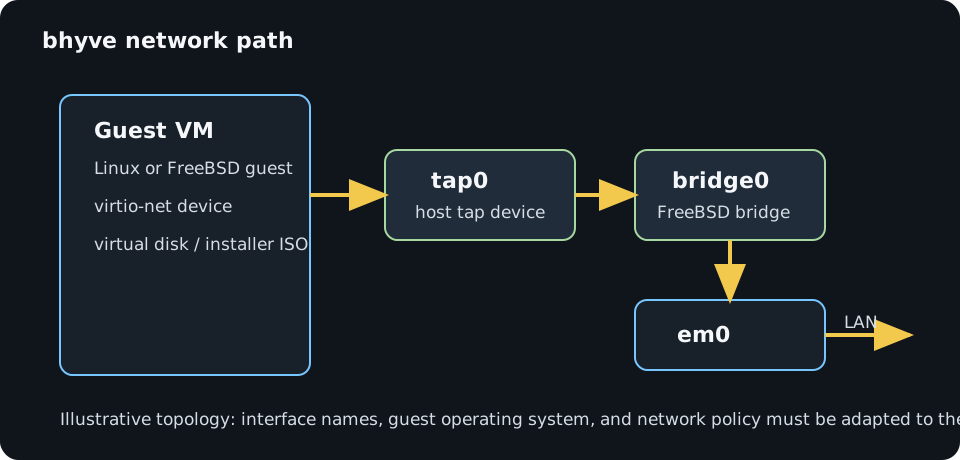
The commands below document the original FreeBSD 10.1 video setup: a bhyve host, a bridged tap interface, and an Ubuntu 15 guest. Treat them as historical reference material rather than a current installation guide.
Original 2015 commands
######## prerequisites for bhyve on FreeBSD ##########

pkg install grub2-bhyve

mkdir /virtual_machines

cd /virtual_machines

mkdir iso

cd iso

fetch http://releases.ubuntu.com/15.04/ubuntu-15.04-server-amd64.iso


######��� Load kernel modules and set sysctl values ######

kldload if_tap

kldload if_bridge

kldload vmm

kldload nmdm

###### set sysctl values� #######3

sysctl net.link.tap.up_on_open=1

sysctl net.inet.ip.forwarding=1

echo "net.link.tap.up_on_open=1" >> /etc/sysctl.conf

echo "vm1:dv=/dev/nmdm1B:br#9600:pa=none:" >> /etc/remote

##### create interfaces needed for the vm� ########


ifconfig tap1 create

ifconfig bridge0 create

ifconfig bridge0 addm tap1 addm em0 up


##### create the config files and virtual disk� ########


truncate -s 10g vm1.img

vi device.map

(hd0) /virtual_machines/ubuntu_server/vm1.img

(cd0) /virtual_machines/iso/ubuntu15server.iso


####### Boot the virtual machines ###########

grub-bhyve -r cd0 -m /virtual_machines/ubuntu_server/device.map -M 1024 vm1


bhyve -c 1 -m 1024M -H -P -A \

-l com1,/dev/nmdm0A \

-s 0:0,hostbridge \

-s 1:0,lpc -s 2:0,virtio-net,tap1 \

-s 3,ahci-cd,/virtual_machines/iso/ubuntu15server.iso \

-s 4,virtio-blk,/virtual_machines/ubuntu_server/vm1.img vm1 &
########### boot into newly installed vm ################333
rub-bhyve -r hd0,msdos1 -m /virtual_machines/ubuntu_server/device.map -M 1024 vm1


bhyve -c 1 -m 1024M -H -P -A \

-l com1,/dev/nmdm0A \

-s 0:0,hostbridge \

-s 1:0,lpc -s 2:0,virtio-net,tap1 \

-s 4,virtio-blk,/virtual_machines/ubuntu_server/vm1.img vm1 &
#################3 bhyve commands and nice to haves ##########
kill running bhyve machines

bhyvectl --destroy --vm=name_of_vm
create bridge and tap interfaces to provision at system boot