found-this-funny-banner-today
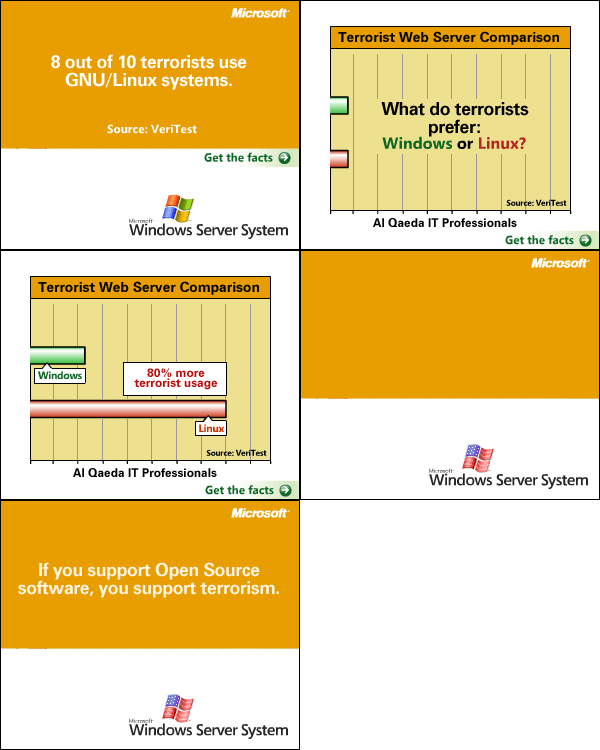
Found This Funny Banner Today!
2010-06-28

This article with aim to take a in depth look at MPLS and explain how your packets get from one side of the MPLS cloud to another. Hopefully this will give you some perspective that will prove useful in troubleshooting issues in your own MPLS implementations.
Most enterprise engineers MPLS experience goes something like this: The company needs to connect the office in Miami and the office in London with the corporate headquarters office in Chicago. The VPN design needs to be flexible, and most importantly the network connecting all 3 sites needs to be full mesh. By this I mean to say that any office should be able to talk to any other office using this MPLS VPN. At this point you contact your MPLS provider and ask them to provision 3 MPLS links, 1 for each of the above mentioned offices. The MPLS Sales team puts you in contact with their engineering department and they ask you a couple questions that they need answered in order to properly provision your lines. the number one question that they ask is “How do you want to send us routes?” �now depending on the size of your organization and the dynamic or static nature of your network you can opt for several options here are 3 of the most common.
I have several Juniper SRX-210 devices configured in remote offices. One of the biggest problems I have is that there are a lot of people that are constantly running scripts against the ssh daemon. Now I could lock it down to only a specified list of allowed IP addresses. This would be the most secure method but i have a business requirement of being able to connect to this device from many different location. There is a command you can use to mitigate brute force attempts.
I was thinking about a new project idea. I was thinking of setting up a dynamic multipoint VPN concentrator. Put a small LAN behind it with a couple of servers. Put the configuration instructions on a webpage for Juniper and Cisco devices. I was thinking to run BGP routing protocol over the interface as it scales reasonably well.
The important part here is I wanted to create a web form which requests the internal and external address ranges of anyones network. Once that person submits that information I will have a Peal script pull those messages from the web form, parse the information, insert the networks and IP addresses into a J-Script template and apply it to my Juniper SRX router automatically.
I see a lot of you out there find this site through various search engines and many of you are searching for information on gre tunnels. I just wanted to say how much I appreciate the traffic and I want to let everyone know that creating an account is free and I would love to hear your feedback on articles and any questions you might have.
I recently came across a problem that is not an uncommon problem that small businesses face. I came up with several solutions to their problems and I thought I would take a minute to discuss one of those solutions. This customer has a business requirement to use a proxy server for all outgoing web traffic. This on the face of it seems like a simple problem, there are many good proxy vendors out their such as my favorite vendor Blue Coat. There are many free alternatives such as Squid Caching Proxy server.
Junipers JUNOS is a very robust operating system, not only is the OS very advanced but the ASIC heavy design of Juniper hardware is akin to calorie free chocolate bars! Juniper Filter Lists which are non-stateful packet filters similar to Cisco Access-Lists are compiled and processed using hardware, what this means is that you can have as many Filter-Lists as you want and as long as you want without degrading performance.
I have been busy lately, I am in the middle of a Data Center migration at work, which is eating up hours of my personal time, and I have a million other projects on the burner. I have fresh content coming but in the mean time, I did a TechCast on Junos, please view the video at http://www.exiletv.com.
Until Next time
I have been continuing to setup the bbs software on bbs.techinvasion.net. I have added irc, gopher, finger, and ident functionality. I encourage all of you to drop by and experience this neat software. The really neat thing about this BBS software is that it connects you to a world of forums and message boards that can only be accessed using BBS software. If you are running firefox I encourage you all to go to gopher://bbs.techinvasion.net. This will let you view the forums and posts, although it doesn’t look the same as it does through a telnet session, it is still very interesting.
Recently as a project cleaning up some old files and software, I came across a software disk for an old BBS I used to run. This got my interest peaked as I wondered if there were still BBS systems Alive and well on the internet. Information on BBS systems was few and far between in my research and it took me a while to make some headway. Eventually I came across http://Synchro.net� BBS software. This software is very similar to old school dos BBS’s. I installed the software which was no small feet�given the inadequate build instructions. Once the system was built and installed I had allot of fun setting up classic door games such as Trade wars and others.